
Google Ads can work for a small business because you pay to appear when someone is already searching for what you sell, and you can see what each click and call produces. It rewards focus: a narrow service area, a clear goal, a modest daily budget and a landing page that matches the ad. It punishes the opposite, which is broad keywords, no tracking and a budget spread across too many campaigns. This guide covers how the system works, what to spend, how to launch, how to measure results and when it makes sense to hand the work to someone else.
Key takeaways
- Google Ads charges per click on most campaigns, and an auction decides whether your ad shows and where, based on your bid plus ad and landing-page quality.
- There is no universal budget. Start small, check performance daily after any budget change, and scale only what produces customers.
- Set up conversion tracking before you launch, or you will be judging the campaign on clicks alone.
- Judge results against sales goals and revenue, not traffic.
- Local businesses usually do best with tight location targeting, specific keywords and a landing page built for one action.
Table of Contents
- How Google Ads works
- What Google Ads costs a small business
- Setting up your first campaign
- Measuring whether it works
- Getting more from a limited budget
- When to hire help
- Our perspective
- How we can help
- FAQ
- Sources
How Google Ads works
You choose keywords, write ads, and Google matches those keywords to related searches or websites. When a search happens, an auction runs. Your bid, the quality of your ad and landing page, competition, the context of the search and the expected impact of your ad assets all feed into whether your ad is eligible and what position it takes.
For a small business, the important part is that the highest bid does not simply win. A plumber in Virginia Beach with a relevant ad and a page that answers the searcher’s question can beat a bigger competitor with a sloppier setup. That is why the page a click lands on matters as much as the ad. If you want a deeper look at how relevance and page quality affect placement, this explainer on keywords, bids and ad relevance shows how visitor questions and page targeting tie into the experience after the click.
Where your ads can appear
Google Ads can reach people across Search, Display, YouTube and Gmail, using text, image and video formats. In practice, small businesses should think about three things:
- Search campaigns show keyword-targeted ads on search results. Google describes them as the way to reach people actively looking for what you offer.
- Display campaigns show contextual ads on relevant pages. They are better for awareness and for reminding past visitors about you.
- Video ads run on YouTube in formats such as skippable in-stream, bumper and Shorts, with availability depending on the campaign goal.
If you have never run ads before, start with Search. The intent is clearest, and the results are the easiest to read.
Targeting that suits local businesses
Google Ads Help lists targeting by keywords, locations, age, language, days, times, frequency and devices. For a local service business, three of those do most of the work:
- Location. Target the cities you actually serve. For a Hampton Roads business, that might mean Virginia Beach, Chesapeake and Norfolk rather than the whole state.
- Time of day. If you only answer phones from 8 a.m. to 6 p.m., consider showing ads when someone can pick up.
- Device. If most of your customers call from a phone, check whether your mobile page makes that one tap.
What Google Ads costs a small business
Google says the right budget depends on your goals, your industry and how much you are willing to spend per customer. Its cost tool offers benchmarks by industry and location. The U.S. Small Business Administration makes a similar point: there is no universal marketing budget percentage, so use benchmarks, track results and move money toward what pays back.
How billing works
Most Search campaigns use cost-per-click bidding. You are charged when someone clicks, and you set a maximum CPC. What you actually pay can be lower.
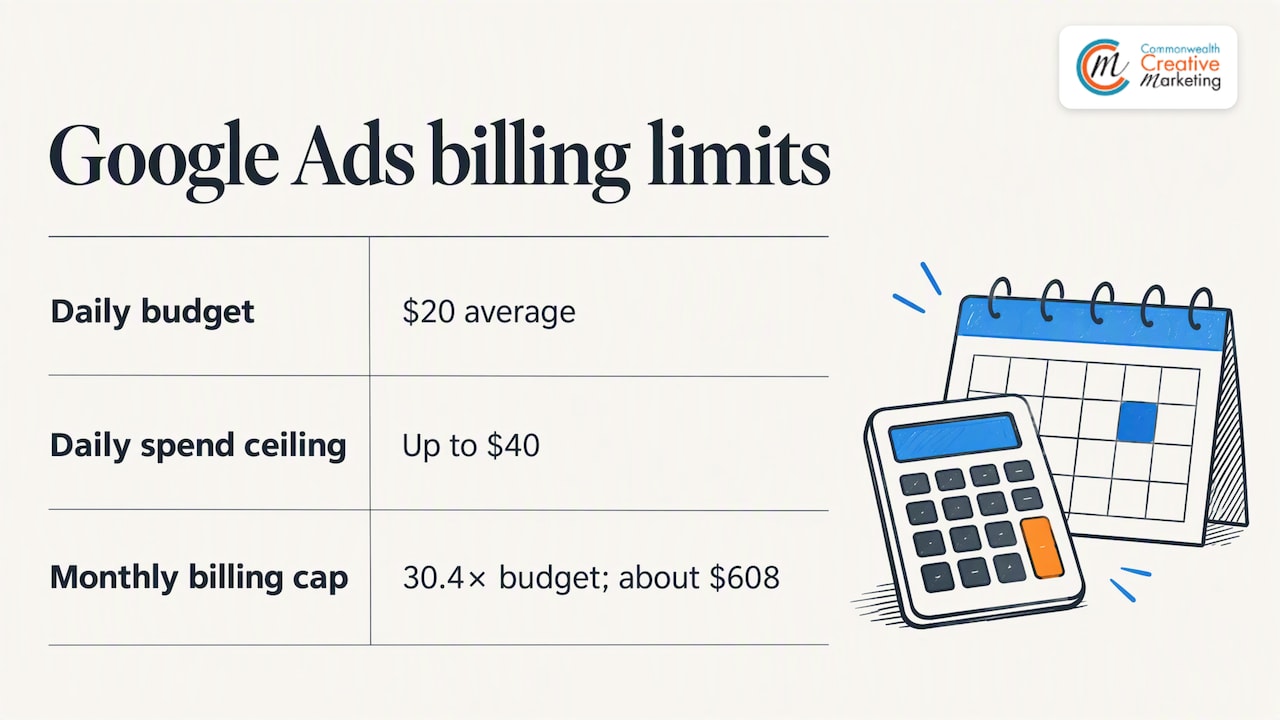
The budget has its own rules. Google multiplies your average daily budget by 30.4 to estimate a monthly budget. On a given day it may spend up to twice your daily budget, but billing for the period is capped at 30.4 times the average daily budget. So a $20 daily budget means a ceiling of about $608 in a month, not a surprise bill.
Picking a starting bid
There is no single correct starting bid. Campaign type, keyword cost and keyword success all matter. Google’s own guidance mentions a US$1 maximum CPC as a beginner example, which is a starting point for learning, not a promise that $1 will win clicks for your keywords. Competitive services such as legal, home repair and dental tend to cost far more per click than low-competition ones, so check the estimates inside your account for your own category.
A way to think about your number
Work backward from a customer, not forward from a budget:
- Estimate what a new customer is worth to you in gross profit.
- Decide what share of that you are willing to spend to win one.
- Estimate how many leads become customers. If one in four callers books, a lead is worth a quarter of that customer allowance.
- Set your daily budget so a month of spend buys enough clicks to learn from.
If the math only works at a cost per lead you can’t reach, the answer might be better keywords, a better page or a different channel. We go deeper on this in our guide to how much a small business should spend on Google Ads.
Setting up your first campaign
Google’s setup sequence runs: add business information, choose a goal, create the ad and assets, choose the audience and budget, confirm payment details and launch. It also advises setting up conversion tracking before launch when online conversions are your objective. The same logic of choosing goals, creating ads and setting up audiences appears in this digital growth process guide.
Before you open the account
Three decisions save the most money:
- Pick one goal. Phone calls, form fills or online sales. Google asks what you want customers to do, and the answer shapes everything else.
- Pick a short list of keywords. Think in the words a customer types when they are ready to buy, such as “emergency AC repair Virginia Beach”, rather than a one-word term like “AC”.
- Fix the landing page. An ad that promises a free estimate should land on a page with the estimate form above the fold, a phone number that works on mobile and proof that you are real: reviews, photos, licenses. If your site is slow, dated or hard to use on a phone, fix it first. That is where responsive web design pays for itself.
Write ads that ask for one thing
Google recommends clear call-to-action text ads and rich media such as image or video for traffic and lead generation. A strong small-business ad names the service, the place and the next step: what you do, where you do it, and “Call today for a free quote”. Test two or three versions of your headlines against each other rather than guessing which one will work.
Launch small
Google recommends starting small and checking account performance daily after applying a new budget. Do exactly that for the first two weeks. Look at which search terms triggered your ads, add irrelevant ones as negative keywords, and pause anything that spends without producing a call or form fill.
Measuring whether it works
Clicks are not customers. Google’s conversion tracking lets you review conversions, cost per conversion, conversion rate, keyword-level conversion data and landing-page data. Google Ads can also track valuable actions such as purchases, downloads and phone orders.
The SBA’s marketing planning guidance calls for defined sales goals, a budget and measurement, including comparing marketing costs with the revenue they generate. Apply that to your account:
| Metric | What it tells you | What to do with it |
|---|---|---|
| Conversions | How many calls, forms or sales the ads produced | Compare against your goal each month |
| Cost per conversion | What each lead or sale costs | Compare against what a customer is worth |
| Conversion rate | How well the page turns clicks into action | If low, fix the page before raising the budget |
| Keyword conversions | Which terms actually bring business | Move budget to winners, pause the rest |
Track the phone calls too. For many local businesses, the phone rings more than the form does, and an account that only counts form fills will look worse than it is. Then ask your staff how callers say they found you, and compare it with the data.
Getting more from a limited budget
The SBA warns that more spend does not automatically mean more customers. Target your ideal customers and prioritize qualified leads over lead volume. Small changes that follow that advice:
- Narrow the geography. Spending on clicks from people you can’t serve is the most common leak.
- Use specific keywords. Longer phrases cost less and signal intent.
- Cut hours you can’t answer. If calls go to voicemail overnight, consider pausing ads then.
- Try remarketing. The SBA describes remarketing as showing ads to people who visited your site or viewed a product before, including abandoned-cart audiences. Visitors who did not call the first time often need a second reminder. See how our retargeting advertising works.
- Don’t skip your free listing. Paid ads and local maps visibility support each other. Our guide to getting your business on Google covers the free side.
Local Services Ads as an alternative
Google also offers Local Services Ads, which are pay-per-lead and automatically determine relevant keywords. They suit certain service trades, and eligibility depends on your category and location. It’s worth checking whether yours qualifies, alongside standard Search campaigns.
When to hire help
Plenty of owners run their own first campaign and learn a lot. Hiring help makes sense when your time is worth more than the management work, when your account has spent money without clear results, or when you want ads, landing pages and local listings working together.
When you talk to any agency, ask these questions:
- Who owns the ad account? It should be yours, in your name, so you keep the data if you leave.
- What is the management fee, and is it separate from ad spend? Your ad spend goes to Google. The fee pays for the work.
- What do you report on? Look for conversions, cost per conversion and calls, not only impressions and clicks.
- Who builds the landing page? Ads and pages need to match.
- Is there a long lock-in contract? Ask for the terms in writing.
Our own Google Ads management covers campaign setup and ongoing management for businesses in Virginia Beach, Norfolk and across Hampton Roads. We don’t publish a fixed price for it, because the right scope depends on your market and goals. Our five key elements of a pay per click campaign explains what we look at first.
Our perspective
We work only with small, locally owned businesses, and the same pattern shows up often: the owner has a decent service and a weak page behind the ad. The ad gets the click, the page loses the customer, and Google Ads takes the blame.
So we start with the basics. Is the site fast on a phone? Does the page say what the ad promised? Is tracking set up? Do your Google listing and reviews back up the claim? Fix those and a modest budget goes a lot further than a big one on a weak foundation.
We also believe small businesses should not be sold more than they need. A narrow campaign aimed at the neighborhoods you serve, measured by calls and booked jobs, beats a broad one that looks impressive in a report. Paid search works best next to local search work, a good website and, where it fits, print and outdoor advertising that keeps your name in front of people who aren’t searching yet.
— User
How we can help
If you would rather have a local team set this up, we handle the pieces together. Our Google Ads management covers campaigns, and local search marketing is $79 per month. A new website design ranges from $1,800 to $3,800 as a one-off project, and hosting and site management starts at $55 per month. Contact us to talk through your goals and budget.
FAQ
Is Google Ads worth it for a small business?
It can be, if you have a clear goal, a page that converts and tracking in place. Google Ads lets you target by location, keyword and time, and measure calls and sales. It is less likely to pay off if you can’t handle the leads or your offer is not competitive.
How much should I spend per month?
There is no fixed amount. Google says the right budget depends on your goals, industry and what you will pay per customer. Start small, check results daily at first, and increase only what produces customers.
How long until I see results?
Clicks can start soon after approval, but useful data takes longer. Plan on reviewing search terms and conversions over the first few weeks, then adjusting keywords, ads and pages. Judge by cost per conversion, not early click counts.
Should I hire an agency or run it myself?
Run it yourself if you have the time to monitor it and learn the tools. Hire help if management would take time from your business or past spending hasn’t produced customers. Whoever manages it, keep the account in your name.
Sources
- Using Google Ads for online marketing, Google Ads Help
- Google Ads vs Local Services Ads for small business
- Drive sales and generate leads, Google Ads Help
- Create a Video campaign, Google Ads Help
- Benefits of online advertising and Google Ads
- Google Ads Cost Tool
- How to Get the Most From Your Marketing Budget, SBA
- Choose your bid and budget, Google Ads Help
- Choose a bid amount that works for you, Google Ads Help
- How To Set Up Your First Google Ads Campaign
- Manage your business: marketing and sales, SBA
- Don’t Get Fooled by These 7 Marketing Myths, SBA
- How Retargeting and Remarketing Helps Your Advertising, SBA