Most local businesses can start Google Ads with roughly $1,000 to $2,000 a month, or $10 to $50 a day for a test, and then adjust based on what each lead is worth. Google itself charges no flat fee or subscription, so the real answer is a number you choose, and the right number depends on your goals, your industry and what a customer is worth to you. This guide shows you how to pick that number, convert it into a daily budget, keep Google from surprising you, and decide when to spend more.
TL;DR
- There is no universal Google Ads budget. Google says there is no flat monthly fee, so you decide what to spend.
- A common starting range for a local business is $1,000 to $2,000 a month, or $10 to $50 a day for a local campaign or keyword test.
- Divide your monthly figure by 30.4 to get the average daily budget Google asks for.
- Work backward from what a customer is worth: a click is only affordable if enough clicks turn into profitable sales.
- Start with one campaign, track conversions, and raise the budget only once the results justify it.
Table of Contents
- What a Google Ads budget actually is
- How much should a small business spend on Google Ads?
- Start from what a customer is worth
- Turn a monthly budget into a daily budget
- Can Google spend more than your daily budget?
- What affects how far your budget goes
- Our perspective: budget for the whole path, not just the clicks
- Cap the risk: how to control your spend
- When to increase your budget
- Is Google Ads right for your business at all?
- Want help setting it up?
- FAQ
- Sources
What a Google Ads budget actually is
A Google Ads budget is a spending ceiling, not a price. You tell Google how much you are comfortable spending, and Google runs your ads until it reaches that limit. Search ads generally use a cost-per-click model, so you pay when someone clicks, not when your ad is shown. Other Google Ads products may charge based on visibility or on an action instead.
That is why two businesses spending the same $1,500 a month can see very different results. One pays $3 a click and the other pays $9. One converts one visitor in twenty and the other one in five. The budget buys you a number of clicks, and the click price and your website decide what those clicks are worth.
How much should a small business spend on Google Ads?
Start with ranges from sources that publish them, then adjust to your own numbers.
| Situation | Typical starting point | Source |
|---|---|---|
| Testing keywords or a single local campaign | $10 to $50 per day | Rhode Island Small Business Development Center |
| Local business wanting steady traffic or leads | About $1,000 to $2,000 per month | Rhode Island Small Business Development Center |
The same guide stresses that no single amount fits everyone, and Google’s own budget tool says the right figure depends on your goals, your industry and how much you are willing to spend per customer. It also offers a benchmark based on your industry and location.
What do those ranges mean in practice? At $1,000 a month you are spending about $32.89 a day. At $2,000 a month it is about $65.79 a day. Those daily figures are our arithmetic using the 30.4-day month Google uses, which we explain below.
Why very small budgets struggle
A budget of a few dollars a day can run, but it can starve you of data. If a click costs several dollars, $5 a day buys one or two clicks. You cannot tell whether your keywords, your ad or your landing page is the problem from that few visits. A smaller budget is fine for a short, narrow test. It is a poor way to judge whether Google Ads works for you.
Why your industry changes the answer
Click prices vary widely by field. Legal, home services and dental searches are among the pricier ones, because many businesses compete for each customer and each customer is worth a lot. If you are a roofer or a family lawyer, expect your $1,500 to buy fewer clicks than it would for a local retailer selling a low-cost product. That is not a reason to skip ads. It is a reason to calculate your numbers before you commit.
Start from what a customer is worth
The most useful budget method starts with your margins, not with a round number. Google’s own guidance on bids says to judge a click by its business value. Its example: if one in ten visits produces a $10 sale, then $1 per click is break-even, and you need to pay less than that to profit.
Here is the same logic applied to a local service business. These figures are illustrative, so replace them with yours.
- Your average new customer is worth $600 in profit over the first year.
- One in ten leads becomes a customer, so a lead is worth about $60.
- One in twenty website visitors becomes a lead, so a click is worth about $3.
- If clicks in your market cost more than $3, you need to improve your conversion rate, your offer or your targeting before adding budget.
This tells you something a generic range cannot: whether a given budget can ever pay for itself. It also shows you the three levers that matter beyond the budget: click cost, the share of visitors who contact you, and the share of leads you close.
Turn a monthly budget into a daily budget
Google asks for a daily budget per campaign, not a monthly one. Google Ads Help explains that an average daily budget is the average amount you are comfortable spending per campaign per day over a month, and not necessarily the exact amount spent every day.
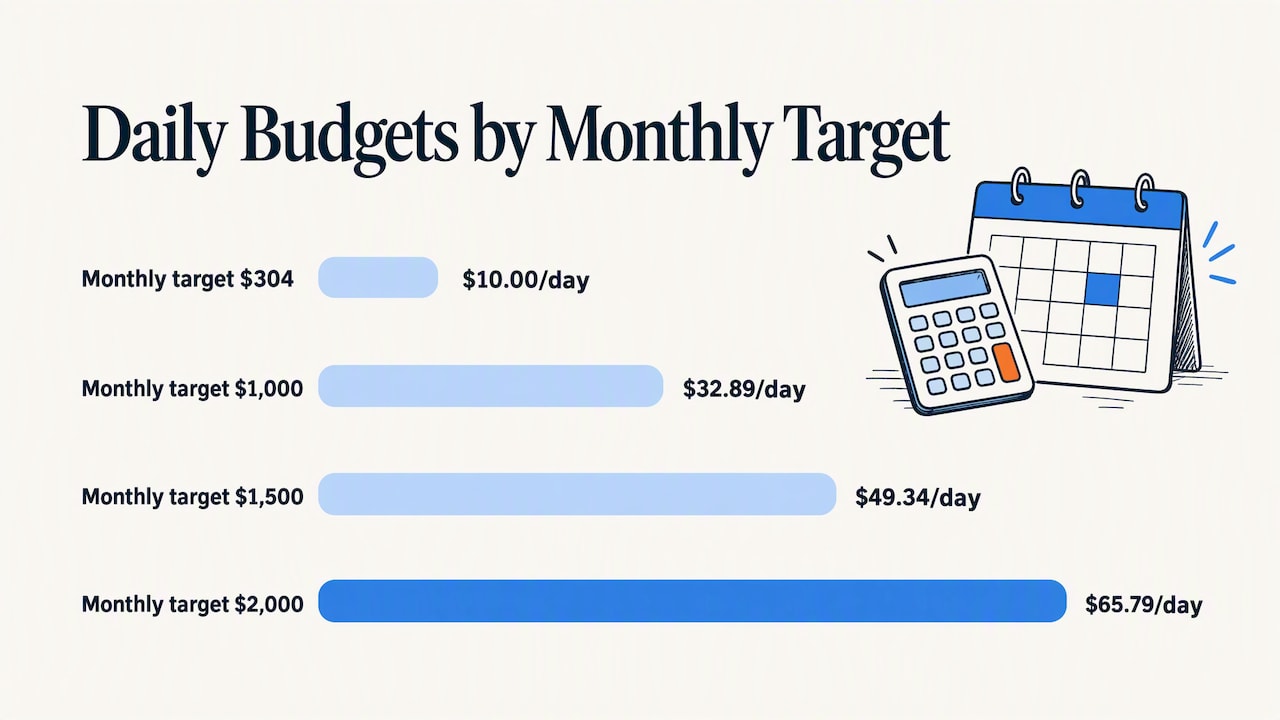
The conversion is simple. For most campaigns the monthly spending limit is 30.4 times the average daily budget, because 30.4 is the average number of days in a month. To go from monthly to daily, divide by 30.4. Google gives the example that $304 a month produces a $10 daily budget.
| Monthly target | Average daily budget (monthly ÷ 30.4) |
|---|---|
| $304 | $10.00 |
| $1,000 | $32.89 |
| $1,500 | $49.34 |
| $2,000 | $65.79 |
If you run more than one campaign, split the money across them. Google’s invoicing guidance shows the idea with a $10,000 example: $7,500 and $2,500 across two campaigns works out to daily budgets of $250 and $83.33 over 30 days. For a small business, a more realistic split is one main campaign for your best-selling service and a smaller one for a second service or a brand-name campaign.
Can Google spend more than your daily budget?
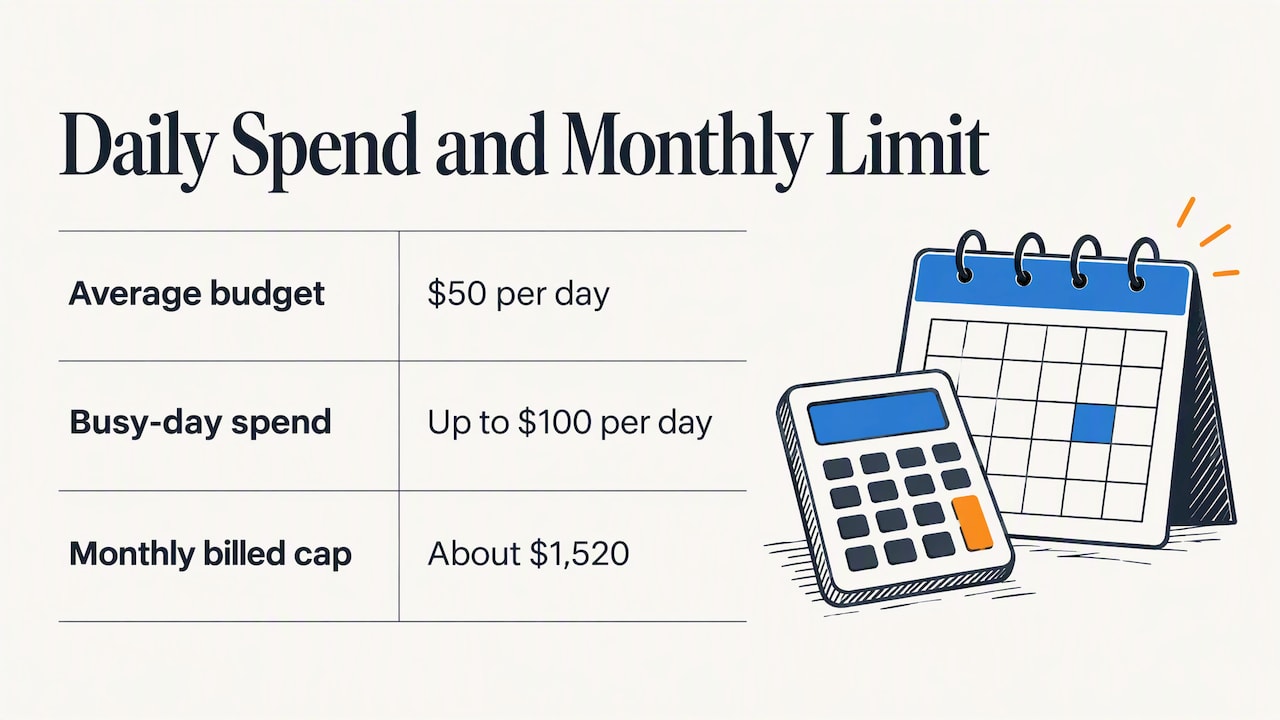
Yes, and this surprises many first-time advertisers. For most campaigns Google may spend up to twice your average daily budget on a particular day when demand is stronger. It may also spend less on slower days. Google states that your billed cost will not exceed the daily spending limit, or the monthly limit of 30.4 times your daily budget.
So a $50 daily budget can show $100 of spend on a busy day, but you should not be billed more than about $1,520 in a month. Judge your spend over the month, not day by day. Google also advises checking the account daily after applying a new budget, which is good practice for the first couple of weeks.
What affects how far your budget goes
A few factors decide whether $1,500 feels generous or tight.
- Goal. Google’s cost guide says costs depend on your marketing goals as well as industry and location. A campaign aimed at phone calls from ready-to-buy searchers is a different spend than one aimed at awareness.
- Keyword competition. Google says there is no single bid that fits every advertiser. The right bid depends on the campaign type, what the keyword costs and how well it converts.
- Location. A tight local target usually costs less than a national one, and it wastes fewer clicks on people you cannot serve.
- Landing page. If your page loads slowly, has no clear next step or does not work on a phone, you pay for clicks that go nowhere. Our web design service starts at $1,800 for exactly this reason: ad spend is wasted on a weak site.
- Bidding strategy. Google says automated bidding can use campaign data to optimize bids. Maximize Conversions suits conversion goals and Maximize Clicks suits traffic goals. With automated bidding the campaign budget controls overall spend, so you do not need a maximum bid just to cap it.
One rule from Google for Performance Max campaigns is worth knowing: the average daily budget should generally be at least three times your target cost per conversion. If you want a lead for $40, plan for at least $120 a day on that campaign type. That alone shows why a tiny budget can stall automated campaigns.
Our perspective: budget for the whole path, not just the clicks
We work only with small, locally owned businesses in Virginia Beach, and the pattern we see is consistent. Owners ask how much to spend on ads, when the better question is how much the whole path from search to phone call is worth. A business that puts its entire marketing budget into clicks and sends them to an outdated page is buying traffic it cannot convert.
So we usually suggest that owners split their thinking in three. First, make sure the landing page is ready, with a clear offer, a visible phone number and a form that works on a phone. Second, start Google Ads with a modest, focused budget around the services that make you the most money. Third, add support channels such as local search marketing once you know which searches turn into customers.
We would also rather you start smaller and keep control. A budget you can sustain for several months teaches you more than a large one you panic about after three weeks. Responsive communication matters here: you should always know where the money went, what came back and what we would change next.
— User
Cap the risk: how to control your spend
Google Ads can feel expensive, mostly when spend is uneven or no one is watching. These habits keep it under control.
- Use the average daily budget and watch the monthly limit. Google says billed costs will not exceed the spending limits, and the Billed cost report shows daily costs.
- Start with one campaign. A single campaign gives you clean data. Several campaigns on a small budget split the money too thin.
- Set up conversion tracking before you spend. Google’s budget tool says conversion tracking shows which ads, keywords and campaigns drive valuable actions like sales or sign-ups, so you can focus your budget on what works. Track phone calls and form fills, not just clicks.
- Check for a limited-by-budget label. Google warns that a campaign marked limited by budget may have additional eligible demand. It also warns that a budget cap you are happy with can quietly become a cap on your profit if every extra dollar would have returned more than it cost.
- Review weekly for the first month, then monthly. Look at search terms, cost per lead and which locations or hours convert.
When to increase your budget
The Rhode Island Small Business Development Center recommends a sensible pattern: start small, test one channel and expand only after the campaign shows an acceptable return. Its example threshold is a 4x return on ad spend, meaning $4 of revenue for every $1 spent. Pick your own threshold based on your margins, since a business with thin margins needs a higher return than one with fat ones.
Signs that it is time to raise the budget:
- Your campaign is marked limited by budget while your cost per lead is below your target.
- You have at least a few weeks of conversion data and the leads are turning into customers.
- You have capacity to serve more customers without hurting quality.
Raise the budget in steps, for example by 20 to 30 percent, then give it a couple of weeks before judging the effect. Large jumps reset what the system has learned and make it hard to see what changed.
Is Google Ads right for your business at all?
It is a good fit when people already search for what you sell, when a new customer is worth enough to cover a click price that may run from a few dollars to well over ten, and when your website can turn a visit into a call. It is a weaker fit if your product is something nobody searches for, or if you cannot answer phones and follow up on leads.
In those cases, other channels can carry more of the load. Local search marketing helps you appear in nearby results without paying per click, and our local search marketing plan is $79 per month. Print, vehicle graphics and outdoor advertising reach people who are not searching yet. Most local businesses do best with a mix, with ads capturing demand that already exists and other channels building it.
Want help setting it up?
If you run a small business in Virginia Beach or Hampton Roads and would rather not learn Google Ads by trial and error, we can set up and manage your campaigns, tie them to a landing page built for conversions and report on what came back. See how our pay per click advertising works, or read about the five elements every pay per click campaign needs. Management fees are not published, so contact us through our website for a quote that fits your budget.
FAQ
How much should I spend per day on Google Ads?
For a local campaign or a keyword test, the Rhode Island Small Business Development Center suggests $10 to $50 per day. Lower end if you are testing a narrow service area, higher if you sell in a competitive field. Check your cost per click first, because a daily budget that buys only one or two clicks will not teach you much.
What is the minimum I can spend on Google Ads?
Google has no flat monthly fee, so technically you can set any daily budget. The useful minimum is what gives you enough clicks to learn from. Many local businesses begin around $1,000 a month for that reason, though the right amount depends on your click costs and what a customer is worth.
Will Google charge me more than my monthly budget?
No. Google may spend up to twice your daily budget on a strong day, but billed cost will not exceed the monthly limit, which is 30.4 times your average daily budget. Daily spend can look uneven, so judge it over the month.
How do I know if my budget is working?
Track conversions such as calls and form submissions, then compare your cost per lead with what a lead is worth to you. If leads cost less than they return, the budget is working and you can scale it. If they cost more, fix the landing page, keywords or offer before adding money.
Sources
- Google Ads Cost Tool: campaign budget
- How much does Google Ads cost? (Google Ads)
- How much should my digital advertising budget be? (Rhode Island SBDC)
- Budgets overview (Google Ads Help)
- About average daily budgets (Google Ads Help)
- Control costs on monthly invoicing (Google Ads Help)
- Choose a bid amount that works for you (Google Ads Help)
- Set your bid strategy and budget (Google Ads Help)
- Step 5: Set your budget (Google Ads Help)