

Good small business web design does three things: it tells visitors who you are and what you do, it looks professional enough to earn their trust, and it makes the next step obvious. Everything else, from fonts to hosting, serves those three jobs. This guide covers the pages you need, the design choices that matter, the difference between design and development, what to budget, and how to keep the site healthy after launch.
Key Takeaways
- A small business site must explain who you are, look credible and point visitors to one clear next step, such as a call, a booking or a purchase.
- Start with five pages: home, about, services, contact and a 404 page. Add privacy and accessibility pages as your business requires.
- Design is how the site looks and works for visitors. Development is how it is built, hosted, secured and kept running. You need both.
- At Commonwealth Creative Marketing, website design runs $1,800 to $4,800 one-off, and hosting and site management start at $55 per month.
- A site is never finished at launch. Updates, backups and security checks are part of the real cost.
Table of Contents
- What a Small Business Website Has to Do
- The Pages Every Small Business Site Needs
- Design Choices That Make a Site Feel Professional
- Web Design vs. Web Development
- Three Ways to Get a Small Business Website Built
- What Small Business Web Design Costs With Us
- Our Perspective
- Make the Site Easy to Find
- Launch Checklist
- Keeping the Site Healthy After Launch
- Ready to Build or Rebuild Your Site?
- FAQ
- Sources
What a Small Business Website Has to Do
A website is not a brochure you publish once. It is the place where a stranger decides whether to call you. Forbes Advisor frames a good small business site around three outcomes: visitors know exactly who you are and what you do, the site looks professional enough to earn trust, and taking the next step is easy. The same article notes that most small business sites fall short on at least one of these. They are light on information, visually inconsistent, or leave visitors unsure what to do next.
That gives you a practical test for any design you review. Open the homepage and ask:
- Can a new visitor tell within a few seconds what you sell and where you work?
- Does the site look like one consistent business, with the same colors, type and tone on every page?
- Is there one obvious action on every page, such as a phone number, a booking button or a quote form?
If the answer to any of these is no, no amount of new features will fix it. Fix the message and the path first.
Visitors also want specifics. Forbes Advisor says they want to know what a service includes, how it works, what it costs and why they should pick your business over another. A plumber in Virginia Beach, a boutique in Norfolk and an accountant in Chesapeake all face the same questions. The site that answers them plainly wins the call.
The Pages Every Small Business Site Needs
Forbes Advisor recommends five essential pages for a service-based small business: a homepage, an about page, one or more services pages, a contact page, and a 404 page for broken or missing links. The US Chamber of Commerce agrees that home, about, and product or service pages are essential, and adds trust signals, visuals, consistent navigation, call-to-action buttons, live chat and FAQs to the list.
Here is how that looks in practice:
| Page | Its job | What to put on it |
|---|---|---|
| Home | Say who you are and who you serve | A one-sentence promise, your main services, one call to action, a few reviews |
| About | Build trust | Your story, your team, your service area, photos of real people |
| Services | Answer “what do I get?” | One section or page per service, what it includes, how it works, pricing guidance |
| Contact | Remove friction | Phone, email, address or service area, a short form, hours |
| 404 | Rescue lost visitors | A friendly message and links back to your main pages |
Separate pages for separate services also help search. A page about one service can match what a customer types far better than one crowded page about everything.
Legal and Trust Pages
The US Chamber of Commerce also states that more than a dozen U.S. states and the European Union require commercial websites to disclose how they use and store data. It recommends a privacy policy, cookie policy, terms and conditions, disclaimers, a refund policy and an accessibility statement. Which ones apply to you depends on what you collect and sell, so ask your attorney which are required for your business and state.
An SSL certificate is not optional either. Business.com calls it mandatory regardless of your goals: it enables HTTPS, encrypts data between your site and visitors, and supports security, customer trust and search visibility.
Design Choices That Make a Site Feel Professional
Most of what makes a site look professional is restraint.
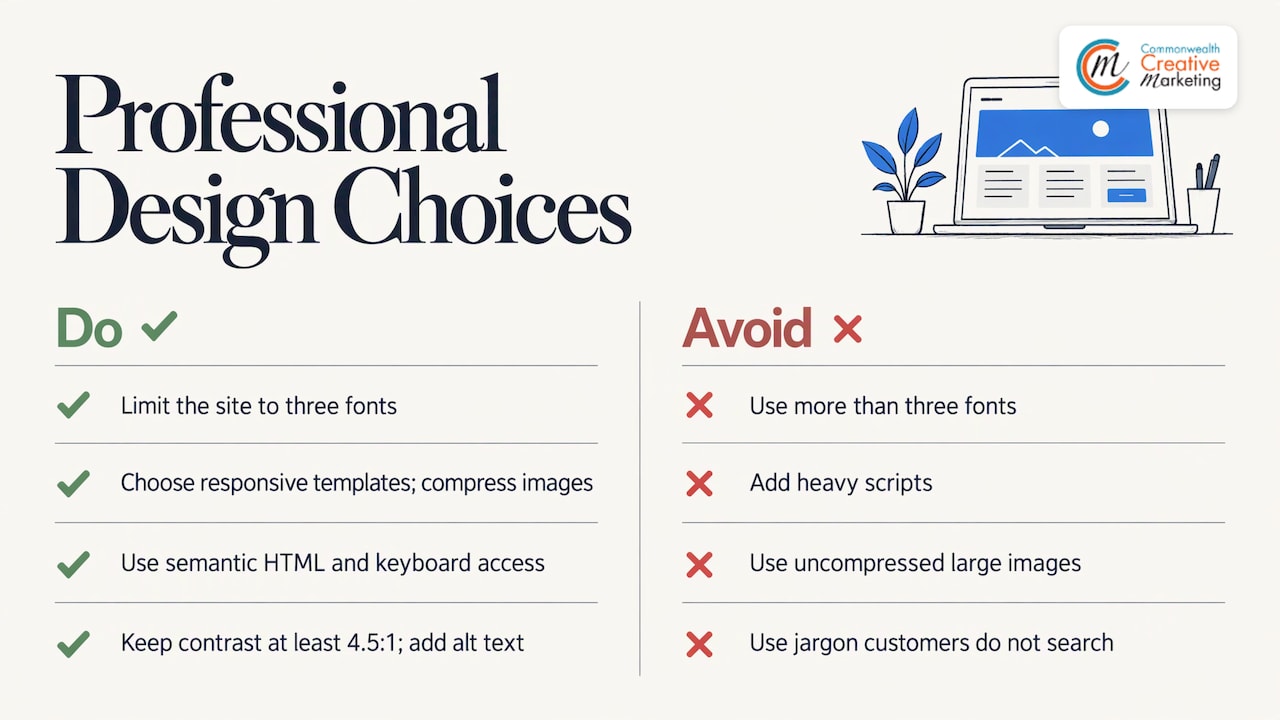
Type. Forbes Advisor suggests no more than three fonts: one for headings that carries personality, a clean one for subheadings, navigation and buttons, and an easy-to-read one for paragraphs. More than that and the page starts to look assembled rather than designed.
Mobile. Many of your customers will find you on a phone. Stripe advises choosing a template that automatically looks good on smaller screens. We build every site to adapt to phones and tablets, and you can read more about our approach to responsive website design.
Speed. Stripe also recommends avoiding heavy scripts and compressing large image files so pages load quickly. Photos straight from a camera are the most common cause of a slow small business site.
Accessibility. Raven SEO, cited in the same Stripe guide, describes accessible design as following WCAG 2.1 guidelines, using semantic HTML, keeping the site navigable by keyboard, using color contrast of at least 4.5:1 and writing descriptive alt text for images. Alt text helps visitors who use screen readers, and it also helps search engines understand your images.
Plain language. Stripe advises describing what you do in the words customers actually search with. If people say “roof repair,” do not title your page “exterior envelope solutions.”
Web Design vs. Web Development
Searchers use “web design” and “web development” almost interchangeably, but the work is different, and knowing the split helps you compare proposals.
- Design covers how the site looks and how visitors move through it: layout, branding, type, color, images, page structure and the calls to action.
- Development covers how the site is built and kept working: the platform, forms, speed, security, hosting, email, integrations and updates.
A good-looking site on weak hosting will load slowly and get hacked. A technically solid site with no clear message will not get calls. For a small business, the sensible approach is one team handling both, so the design and the build are planned together. That is how we work: design, hosting and ongoing site management under one roof. Our article on why good web design matters goes deeper on the design side.
Three Ways to Get a Small Business Website Built
Business.com identifies three main paths, and each fits a different owner.
- A hosted website builder. Services such as Squarespace, Wix and Shopify bundle hosting, templates and editing tools into one subscription that starts in the low tens of dollars per month. This is quick, but you write the content, make the design decisions and tune the site yourself.
- A self-hosted content management system such as WordPress. It offers near-limitless flexibility through themes and plugins, but you arrange your own hosting and take on more responsibility for updates and security.
- A developer or agency. This is the route for a custom site built around your business, with someone else carrying the technical work.
If your time is worth more spent serving customers than learning a platform, the third path usually makes sense. A local agency also knows your market. We work only with small, locally owned businesses in Virginia Beach, so we know the customers you are trying to reach, and our WordPress website designs are built with organic search in mind from the start.
What Small Business Web Design Costs With Us
Price depends on how many pages you need, how much custom design and content the site requires, and whether you want features such as online booking or a store. These are our published prices:
| Service | Price |
|---|---|
| Website design | $1,800 to $4,800, one-off |
| Hosting and site management | From $55 per month |
| Local search marketing | $79 per month |
| AEO (answer engine optimization) | $1,150 to $2,000 per month |
The design fee is a project cost: you pay it once for the build. Hosting and management is the ongoing part, and it covers the work described in the next sections. Local search marketing and AEO are optional additions for when you want the site to be found, not just to exist. Our Website Design page explains what a project involves, and we scope each one to the individual business, so the right figure in that range depends on what you need.
Our Perspective
We have built sites for local businesses long enough to see the same pattern. The owners who get results are rarely the ones with the flashiest design. They are the ones whose site says plainly what they do, shows real work and makes calling easy.
That is why we do not treat a website as a standalone art project. A site has to be found, load fast, stay secure and lead to a phone call. So we pair design with hosting, management and search work, and we keep everything with one team that answers when you call.
Small businesses also should not need an enterprise budget to look professional. Our design pricing is published, our hosting starts at $55 per month, and we tailor each project to your business rather than selling a template to everyone. If your site is doing less than it should, start by looking at the message and the path to contact. We are happy to look with you.
Marc
Make the Site Easy to Find
A well-designed site that nobody finds does not help. The US Chamber of Commerce recommends that small businesses prioritize on-page SEO: keyword-rich title tags under 60 characters, internal links with descriptive anchor text, images with descriptive filenames and alt text, and original content built around what searchers want.
For a local business, two more steps matter. Stripe recommends claiming a free Google Business Profile to improve local visibility. And it advises building a clear FAQ section, detailed service descriptions or a simple blog that solves customer problems, rather than worrying about complex algorithms.
If you want help beyond the basics, our guides on small business SEO and content improvements for local SEO cover where to start. Many customers now also get answers from AI search tools, which we cover in how small businesses get cited in AI search.
Launch Checklist
Business.com lays out a ten-step build process: define your purpose and goals, choose and register a domain name, select a builder or CMS, choose a host, plan the site structure and pages, design the site, create and optimize content, add features and integrations, test and launch, then maintain and grow. Before you go live, it advises testing the following:
- The site in major browsers and on phones, tablets and desktops
- Every link, to catch broken ones
- Every form, by submitting it and confirming the message arrives
- Page-load speed
- That SSL is active
Do the form test with a real email address. A contact form that silently fails is the most expensive bug a small business site can have, because you never learn about the customers you lost.
Keeping the Site Healthy After Launch
Launch is where the ongoing work starts. Business.com lists the routine: install software and plugin updates, run regular backups, apply security patches, refresh content, use analytics to understand visitor behavior and keep improving your search presence.
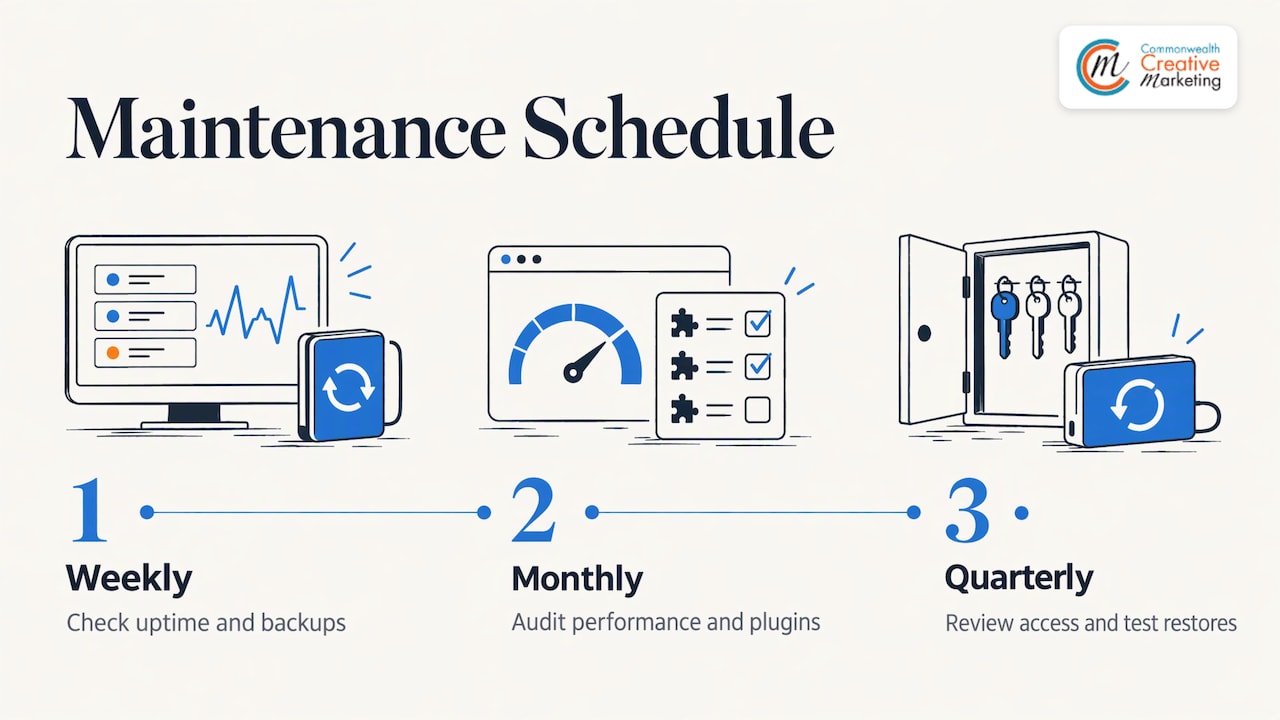
This matters most on WordPress. Superpress reports that 96% of new vulnerabilities are in plugins (Patchstack, 2025) and that 39% of hacked CMS sites were running outdated software when breached (Sucuri, 2023). It recommends weekly checks for uptime and backups, monthly performance and plugin audits, and quarterly access reviews and restore tests for business-critical sites. Its author adds that the aim is to protect the paths customers use, such as forms and checkout, not just to keep plugins current.
Most owners do not want to run that schedule themselves. That is what our hosting and site management plan is for, from $55 per month. You can see what regular upkeep involves in our guides to professional website management and website maintenance services.
Ready to Build or Rebuild Your Site?
If you run a small business in Virginia Beach or nearby, we design, host and manage your website, and we can add local search, Google Ads and print or outdoor advertising when you are ready. Design projects run $1,800 to $4,800, and we scope each one to what your business needs.

Start on our Website Design page, or see our Hosting & Site Management plan for the ongoing side. You can also reach us through ccm-web.com.
FAQ
How many pages does a small business website need?
Five is a solid starting point: home, about, services, contact and a 404 page. Add a separate page for each major service, plus privacy and accessibility pages as your business requires. You can always grow the site once it is bringing in calls.
Should I use a website builder or hire a designer?
A builder suits owners who have time to learn the tool and write their own content. Hiring a designer suits owners who want a custom site and want the technical work handled. We take the second approach for local Virginia Beach businesses, with design from $1,800.
How much does hosting and upkeep cost?
Our hosting and site management plan starts at $55 per month. It covers the ongoing work a site needs, such as updates, backups and security. The final price depends on the site you have.
Does my site need to be accessible?
Yes, accessible design helps all visitors, including those who use screen readers or keyboards. It includes descriptive alt text, readable color contrast and keyboard navigation. The US Chamber of Commerce recommends following ADA guidelines, so ask your attorney what applies to your business.
Sources
- Small Business Website Design Best Practices (2026), Forbes Advisor
- What to Include on Your Business Website, US Chamber of Commerce
- 4 Types of SEO Every Small Business Should Understand, US Chamber of Commerce
- How to Create a Website for Your Small Business, Business.com
- How to Create and Maintain a Small Business Website, Stripe
- The WordPress Maintenance Checklist for Business-Critical Sites, Superpress